> For the complete documentation index, see [llms.txt](https://flexconversion-product-rental.gitbook.io/user-guide/llms.txt). Markdown versions of documentation pages are available by appending `.md` to page URLs; this page is available as [Markdown](https://flexconversion-product-rental.gitbook.io/user-guide/product-guides/rentals/create-rental-order-via-shopify-pos.md).

# Create rental order via Shopify POS

Our app works with Shopify POS. From Shopify POS, you can create a manual rental order for an in-store customer.

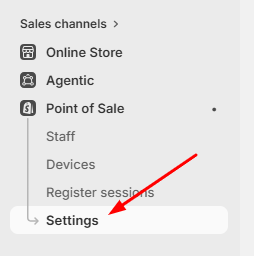
* **Step 1:** Open **Point of Sale** in Shopify admin > **Settings**

<figure><img src="https://2585520247-files.gitbook.io/~/files/v0/b/gitbook-x-prod.appspot.com/o/spaces%2Fuc1KOPs8RpgxtO4ZGPKv%2Fuploads%2FEZIvDlpaZeusXvULQmQM%2Fimage.png?alt=media&amp;token=c1632412-2980-4806-ab7c-a4d5d0d335fe" alt=""><figcaption></figcaption></figure>

* **Step 2:** Find **Customization** sectio&#x6E;**: POS app**

<figure><img src="https://2585520247-files.gitbook.io/~/files/v0/b/gitbook-x-prod.appspot.com/o/spaces%2Fuc1KOPs8RpgxtO4ZGPKv%2Fuploads%2FIOsqUtDK77Lj9QhlZ3dM%2Fimage.png?alt=media&amp;token=871c5752-a7cd-461d-af42-0081969d1c9f" alt=""><figcaption></figcaption></figure>

* **Step 3:** Open a page > Click **Add title** > Select Embedded Apps

<figure><img src="https://2585520247-files.gitbook.io/~/files/v0/b/gitbook-x-prod.appspot.com/o/spaces%2Fuc1KOPs8RpgxtO4ZGPKv%2Fuploads%2Foz17wCuFD9rkCSeW5wrW%2Fimage.png?alt=media&amp;token=11ccb9c3-53c5-4aef-b3a8-b489c70d2f91" alt=""><figcaption></figcaption></figure>

* **Step 4:** Find **FlexCon Rental** & **Save**

<figure><img src="https://2585520247-files.gitbook.io/~/files/v0/b/gitbook-x-prod.appspot.com/o/spaces%2Fuc1KOPs8RpgxtO4ZGPKv%2Fuploads%2FSE8PNfXCUQwL6fb6KqTS%2Fimage.png?alt=media&amp;token=0e0d8438-87f8-43c1-a445-7f3728e6bfb7" alt=""><figcaption></figcaption></figure>

When opening the **Shopify POS app,** click on the **FlexCon Rental** section

<figure><img src="https://2585520247-files.gitbook.io/~/files/v0/b/gitbook-x-prod.appspot.com/o/spaces%2Fuc1KOPs8RpgxtO4ZGPKv%2Fuploads%2FqCE46hDSCWnMuPNLwo5Y%2FIMG_2925.PNG?alt=media&amp;token=8964f584-804b-4ce9-bd67-5163b1660fc7" alt="" width="375"><figcaption></figcaption></figure>

Our app will display the **Rentals** tab first. You can create manual rental order for walk-in customers.

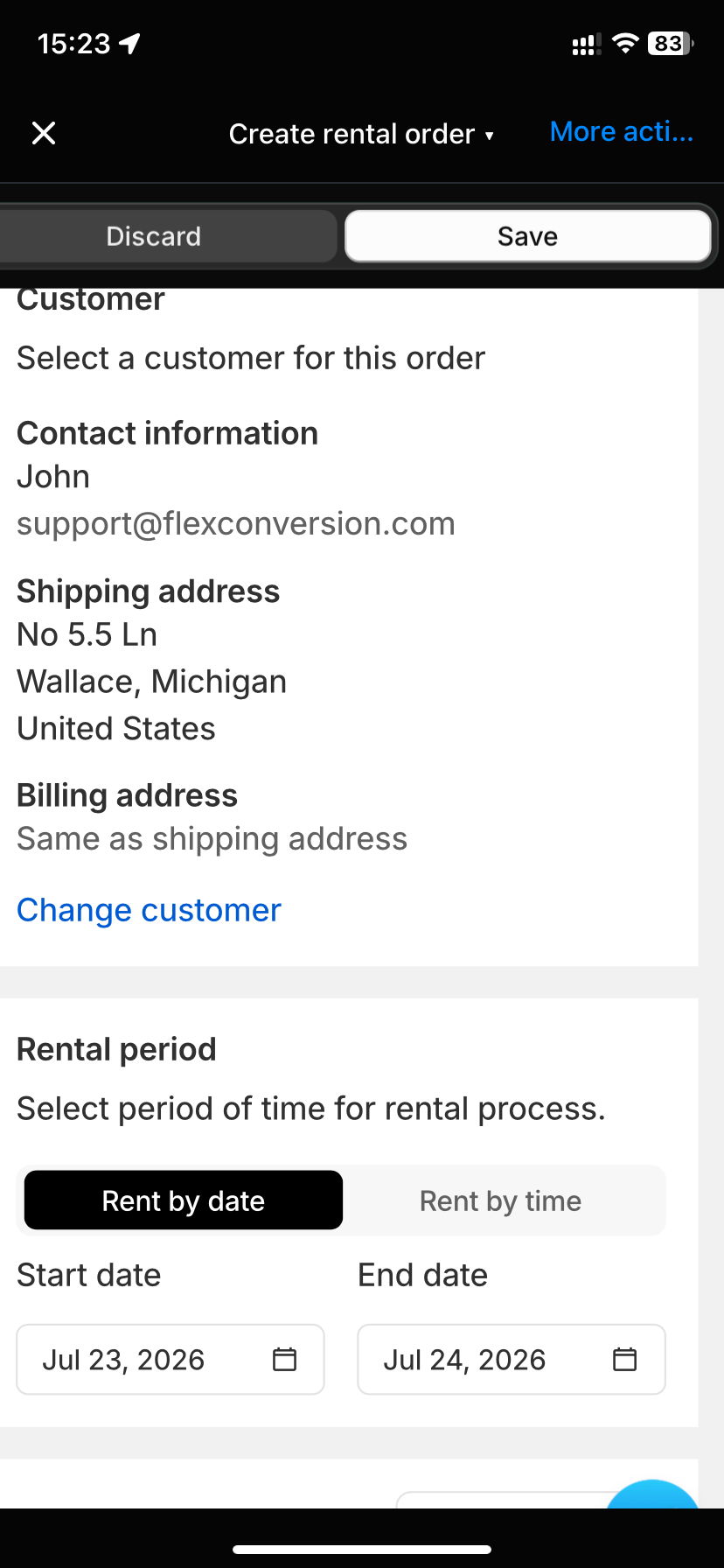
Select **Create rental** to add new rental.

<figure><img src="https://2585520247-files.gitbook.io/~/files/v0/b/gitbook-x-prod.appspot.com/o/spaces%2Fuc1KOPs8RpgxtO4ZGPKv%2Fuploads%2FpE7o6ao2aRB2oXrEyxD0%2FIMG_2926.PNG?alt=media&amp;token=852042d2-ccd5-436d-bea2-0c8c3582c77b" alt="" width="375"><figcaption></figcaption></figure>

Please select the following information:&#x20;

* **Customer** (you can select an existing customer or create a new one)
* **Rental duration** (you will need to select rental start/end date/time)
* **Rental products** (our system will show available products for the selected duration). Please enter the quantity and also the rental price

Then, please select **Save** to create the rental order. This order will be in Draft state. Please follow the next step to confirm the rental order.

<figure><img src="https://2585520247-files.gitbook.io/~/files/v0/b/gitbook-x-prod.appspot.com/o/spaces%2Fuc1KOPs8RpgxtO4ZGPKv%2Fuploads%2FUZoHCr2Smw3tjhrUUjcj%2FIMG_2927.PNG?alt=media&amp;token=85adf8a8-b5db-4a85-8587-44d14d099a02" alt="" width="375"><figcaption></figcaption></figure>

To confirm the order, please select **Check order** button. Our system will redirect you to the Shopify Order details&#x20;

<figure><img src="https://2585520247-files.gitbook.io/~/files/v0/b/gitbook-x-prod.appspot.com/o/spaces%2Fuc1KOPs8RpgxtO4ZGPKv%2Fuploads%2F3rmzGvFHu5INMdJg3kGE%2FIMG_2928.PNG?alt=media&amp;token=0578579c-cb42-40a6-9546-a7b0be0fb3ae" alt="" width="375"><figcaption></figcaption></figure>

On this screen, please select **Collect payment** to confirm the rental order. Please mark it as paid or enter the customer's credit card.

<figure><img src="https://2585520247-files.gitbook.io/~/files/v0/b/gitbook-x-prod.appspot.com/o/spaces%2Fuc1KOPs8RpgxtO4ZGPKv%2Fuploads%2FHuF2LaIoZCDOarapDsBC%2FIMG_2929.PNG?alt=media&amp;token=f83cf25a-b596-488f-aacc-7a5bc31c42e2" alt="" width="375"><figcaption></figcaption></figure>

After that, the draft order will be converted to the official Shopify order. Please also **Mark as fulfilled** to confirm that the item is handed to the customer.&#x20;

It's important for future rental return confirmation.
<figure><img src="https://2585520247-files.gitbook.io/~/files/v0/b/gitbook-x-prod.appspot.com/o/spaces%2Fuc1KOPs8RpgxtO4ZGPKv%2Fuploads%2FwISu2m0F5nYuGG6CqEKf%2FIMG_2930.PNG?alt=media&amp;token=38ec9524-25bc-4a2b-a2fe-d9dde53d567d" alt="" width="375"><figcaption></figcaption></figure>